X-Plane (all versions)
The X-Plane (all versions) action type is the preferred way to send events to X-Plane. It provides access to over 7,000 presets from HubHop to interface with many popular aircraft supported by the simulator.
Tip
To update the HubHop event list, select the Download Latest Presets menu item from the Extras > HubHop menu.
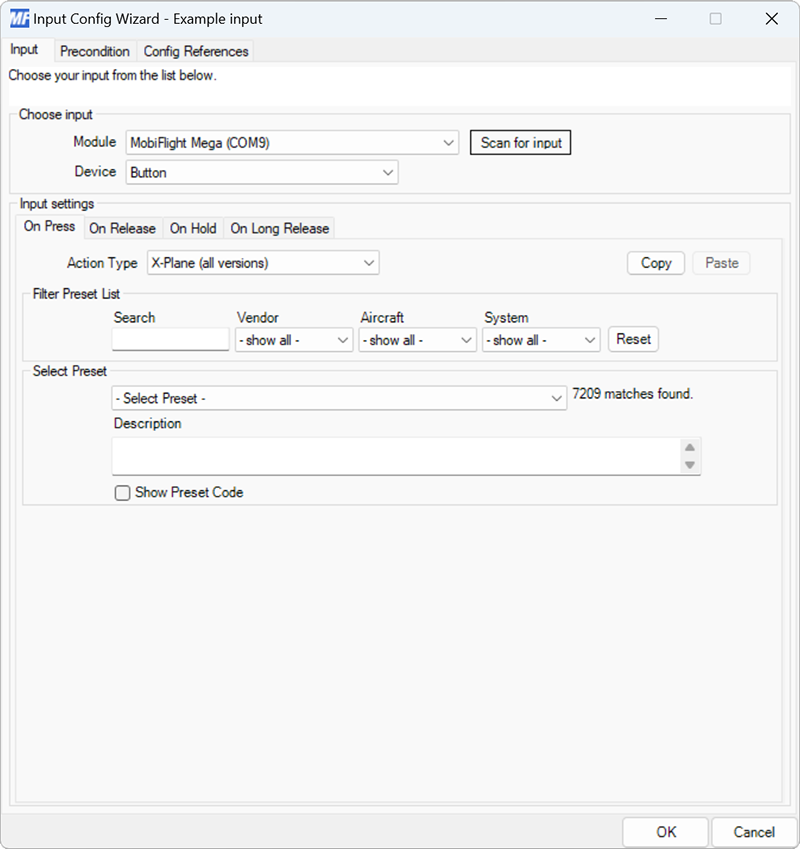
| Setting | Description |
|---|---|
| Filter presets by text | Provides text filtering of the HubHop presets. |
| Filter by vendor | Filters the list of HubHop presets by the aircraft vendor. |
| Filter by aircraft | Filters the list of HubHop presets by the aircraft name. |
| Filter by system | Filters the list of HubHop presets by the aircraft system. |
| Preset list | Selects the preset to send when the action type is triggered. |
| Input type | Specifies the type of custom preset, either DataRef or Command. |
| Path | Specifies the DataRef or command to invoke. |
| Value | Specifies the value to send to the simulator. Supports value modification with NCalc. |
Tip
To enter custom event code, use the Input Type, Path and Value fields in Step 3 - Customize preset. There is no need to select any values from the HubHop filtering dropdowns.