Joining the beta program
The MobiFlight team produces regular beta versions that include new features, app improvements, and bug fixes. Beta program participants provide valuable feedback on new features, and get early access to the latest features under development.
Warning
Beta releases may contain bugs, and identifying those issues before a broader release is a key goal of the beta program. They may also include features incompatible with prior releases. Before joining the beta, ensure you have backups of project files and board configurations.
To provide beta feedback, join the MobiFlight Discord and post in the #beta channel.
Joining the beta program
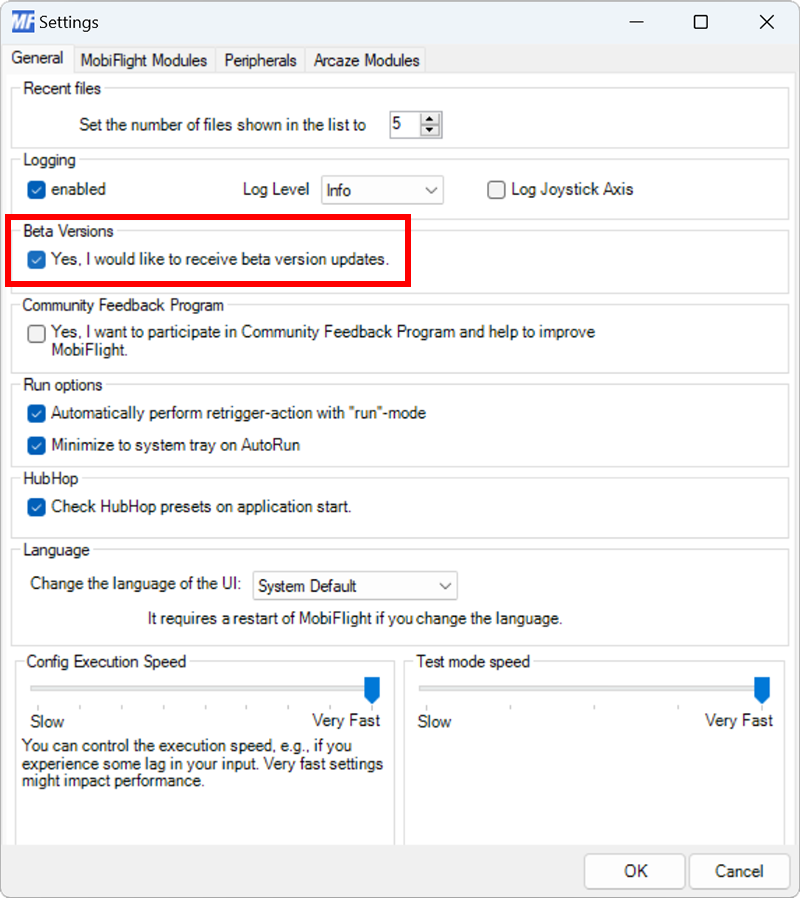
To join the MobiFlight beta program, select Settings from the Extras menu, then check the Yes, I would like to receive beta version updates option. Click OK to close the dialog, then restart MobiFlight. The app will prompt to download and install the latest beta.
Leaving the beta program
To leave the beta program:
Opt out of beta builds
Select Settings from the Extras menu, then un-check the Yes, I would like to receive beta version updates option.
Uninstall the beta version of MobiFlight
Use the Windows Installed apps control panel to uninstall the beta version.
Install the released version of MobiFlight
Download the latest released version and install it.